

Trial ended, payment failed or account blocked
What happens when your trial ends, when a payment fails, what "blocked" means and how to fix it in two minutes.

This article is about what you pay us for your plan. In short: we warn you well in advance, you always get two weeks' grace, and tickets you have already sold always stay valid. Your visitors won't notice a thing.
What you need
- The owner role to set up a payment method. An administrator (your treasurer, for example) can pay an outstanding invoice.
- A payment card or another payment method our payment provider accepts.
When your trial ends
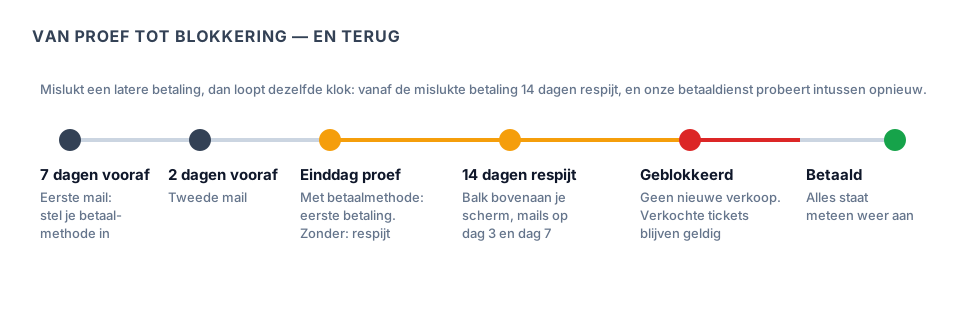
A paid plan starts with a free trial. If no payment method is set up yet, we email you 7 days and 2 days before the end. The email has a button that takes you straight to your Subscription page.
- With a payment method: on the last day of your trial the first payment happens automatically. You don't have to do anything, and your invoice arrives by email.
- Without a payment method: you can keep working as usual. You get 14 days' grace. A red bar at the top of your screen shows the date your account will be blocked, and you get an email on day 3 and on day 7.
How to set up your payment method
- In the menu on the left, go to Subscription.
- Click Set up automatic payment.
- Enter your card on the secure screen of our payment provider and confirm.
Done. We never store your card details ourselves.
When a payment fails
Sometimes a payment doesn't go through: your card has expired, or there wasn't enough on your account. Then:
- you get an email straight away, and a bar appears at the top of your screen;
- our payment provider tries again automatically over the next few days. If that works, everything is fine and you don't need to do anything;
- you have 14 days to sort it out, counted from the failed payment. You get a reminder on day 3 and day 7.
If you'd rather not wait, go to Subscription and choose:
- Pay now to pay the outstanding invoice right away, with another card if you like;
- Change payment method to replace your card. We then immediately try the outstanding invoice with your new card.
What "blocked" means
If the payment still hasn't come through after 14 days, your account is blocked. You get an email about it.
| While blocked | |
|---|---|
| Your ticket shop | Stays online, but sells nothing new. Visitors see a neutral message, with nothing about invoices. |
| Your till | Sells nothing. |
| Tickets already sold | Stay valid. Scanning at the door, the wallet pass and the ticket email keep working. |
| Your back office | Only the Subscription page opens. There you can pay, download your invoices and export your data. |
| Your data | Nothing is deleted. |
Taking your data with you
At the top of the Subscription page is the Export data button. You get a zip file with your orders, your tickets and your invoices, as tables you can open in Excel or any other spreadsheet. This always works, even when your account is blocked.
How to lift a block

- Log in. You land on the Subscription page automatically.
- Click Set up automatic payment (if there was no payment method yet) or Pay now (if an invoice is outstanding).
- Complete the payment.
As soon as the payment has gone through, everything is back on straight away — your shop, your till and your whole back office. You get an email to confirm. Nothing is lost.
Would you rather not pay? Then choose Change your plan on the same page and switch to the free plan. That one is never blocked.
Frequently asked questions
Will my visitors notice a block? Anyone who already has a ticket won't: it stays valid. Anyone who wants to buy something new sees that sales are temporarily paused — with no explanation about invoices.
I've paid, but I still see the bar. Refresh the page. A payment usually comes in within seconds. If you still see the bar after an hour, email us at support@passavo.eu.
Is the free plan ever blocked? No. There is nothing to pay on the free plan, so there is nothing to block.
Which VAT is on my invoice? That is explained in Your plan, your invoices and pausing.
Updated on 2026-09-23
Read next
-
Payments and payouts
Bar balance on a pass
What a balance on a pass is, where that money sits, and how to read afterwards what was to...
-
Payments and payouts
Refer an organisation, and both get a month free
Where to find your referral link, what the other party gets, what you get, when that month...
-
Payments and payouts
Your plan and your limits
What the bar at the top of your screen means, where you stand against your limits, and wha...
Still stuck? Write to us at support@passavo.eu