

Which payment provider do you choose?
Mollie, Stripe and Bancontact Pro side by side — which payment methods, where to find their rates, in which country, and who each of them is meant for.
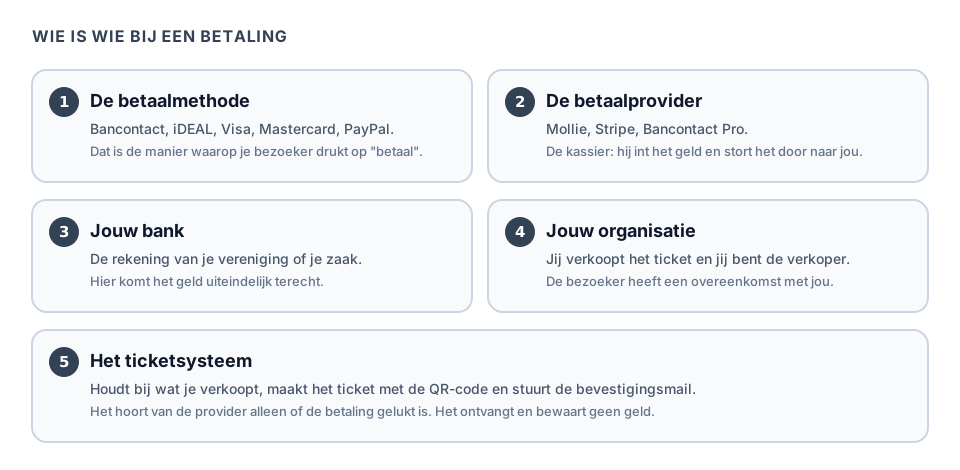
There are three providers you can connect to Passavo: Mollie, Stripe and Bancontact Pro (which was called Payconiq until March 2026, and with which you accept the Bancontact Pay app of your visitor). This article puts them side by side, so that in ten minutes you know which one suits you.
One thing first: you can connect several, but your ticket shop uses one at a time. Your visitor only sees the payment methods of that active provider.
Do you not yet know what a payment provider is? Then start at What is a payment provider?
The short answer
| Your situation | Choose |
|---|---|
| Belgian association, Belgian visitors | Mollie |
| You also expect Dutch visitors | Mollie |
| You sell to foreign tourists | Stripe |
| Your organisation is in Bulgaria | Stripe |
| Online, you only want to offer the Bancontact Pay app | Bancontact Pro |
If you are in doubt, take Mollie. For a Belgian association with Belgian visitors that is the right choice nine times out of ten, and you can always switch provider later.
First: what is a payment method?
A method is the button your visitor presses. A provider is the company that offers those buttons for you. One provider can offer several methods.
| Method | What it is | Where people know it |
|---|---|---|
| Bancontact | The Belgian bank card, confirmed online with your bank's app or card reader | Belgium only |
| iDEAL | The Dutch way of paying straight from your bank account. Being absorbed into the European Wero | The Netherlands only |
| Bancontact Pay | The Belgian payment app with the QR code (formerly Payconiq) | Belgium, and in Luxembourg via the same app |
| Card | Visa, Mastercard, Maestro | Everywhere |
| PayPal | Paying with your PayPal account | Everywhere, popular in Germany |
| Apple Pay / Google Pay | The card that is already in the phone | Everywhere, on devices that support it |
| Bank transfer | The classic transfer, with a reference | Everywhere, but slow |
Note: Bancontact does not work in the Netherlands and iDEAL does not work in Belgium. That is the most common misconception in this whole chapter. They are national systems. If you want to sell to both, you switch on both methods with your provider — which is exactly what Mollie and Stripe make possible. Bancontact Pro cannot do that: it only offers the Bancontact Pay app.
The three providers side by side
| Mollie | Stripe | Bancontact Pro | |
|---|---|---|---|
| Who for | Associations and small businesses in the Benelux | Anyone selling internationally or based outside the Mollie countries | Anyone who only wants to offer the Belgian payment app online |
| Methods in Passavo | Everything you switch on at Mollie: Bancontact, iDEAL, card, PayPal and more | Card, Bancontact and iDEAL. Apple Pay and Google Pay come along with the card | The Bancontact Pay app only |
| Connecting | One button, you sign in at Mollie | One button, you sign in at Stripe | You paste a key you get from them |
| Language of the support | Dutch | English, partly Dutch | Dutch and French |
| What your visitor sees | Mollie's payment page | Stripe's payment page | A QR code in your ticket shop, which they scan with their banking app or the Bancontact Pay app |
What it costs
All three charge a transaction cost per successful payment: a fixed amount, sometimes with a percentage on top. That cost is kept back from your payout; Passavo takes nothing from it. See Payout and costs.
Exactly what that cost is differs per method, per country and sometimes according to your turnover, and it changes regularly. That is why there are no amounts here. Check the price list on the provider's own site before you sign.
- According to their price lists, Mollie and Stripe charge no set-up cost and no monthly amount: you pay per successful payment.
- With Bancontact Pro the sign-up often runs via your bank or via a partner, and you then agree your rate and any fixed costs with them. Get it in black and white before you do your sums.
Do not choose on the last cent. The differences between providers are small next to the difference in which methods your visitors know: one visitor who gives up because their method is not there costs you more than the whole difference.
Which method works in which country?
This table is about your visitors: what do they pay with, and via which provider do you get that in your ticket shop.
| Country of your visitor | What they are used to | You get it via |
|---|---|---|
| Belgium | Bancontact, Bancontact Pay, card | Mollie, Stripe, Bancontact Pro |
| The Netherlands | iDEAL (Wero), card | Mollie, Stripe |
| Germany | Card, PayPal, bank transfer | Card: Mollie, Stripe. PayPal: Mollie only |
| France | Card (Carte Bancaire) | Mollie, Stripe |
| Italy | Card, PayPal | Card: Mollie, Stripe. PayPal: Mollie only |
| Spain | Card, Bizum | Card: Mollie, Stripe |
| Bulgaria | Card | Mollie, Stripe |
Two things to know alongside this:
- A card always works. Wherever your visitor comes from, with Visa or Mastercard they get through your checkout. The national methods are there to make it easier and cheaper, not to make it possible.
- What appears in your shop, you switch on with your provider. In your Mollie dashboard you tick per method whether you accept it; Passavo passes no list along and shows what you have switched on there. With Stripe, Passavo always asks for card, Bancontact and iDEAL; so switch those three on in your own Stripe dashboard, or the payment page will not open.
Wero: what to know before you switch it on
Wero is the banks' new European payment system. Your visitor pays from their banking app. In the Netherlands it is gradually replacing iDEAL; in Belgium and Germany you offer it through Mollie, where it is still in beta.
One difference to know before you switch it on:
- A Wero payment is not guaranteed. Your visitor can have it charged back through their bank up to 120 days after paying, just like a card payment. A ticket bought in June and scanned in July can still be charged back in September.
- Bancontact and Bancontact Pay don't have this. They are direct account-to-account payments with no chargeback right.
What to do with it:
- To offer Wero, switch it on in your Mollie dashboard. Passavo then shows it in your shop automatically.
- On your dashboard, Payment methods shows how much came in through Wero, separately from card and Bancontact.
- If you do get a chargeback, you'll find it in your Mollie dashboard on the payment itself.
In which country can you open an account?
This table is about your organisation, not about your visitors.
| Country of your organisation | Mollie | Stripe | Bancontact Pro |
|---|---|---|---|
| Belgium | yes | yes | yes |
| The Netherlands | yes | yes | no |
| Germany | yes | yes | no |
| France | yes | yes | no |
| Italy | yes | yes | no |
| Spain | yes | yes | no |
| Bulgaria | no | yes | no |
Mollie works with merchants in more than twenty European countries, but Bulgaria is not among them at the time of writing. If you are in Bulgaria, take Stripe. You apply for a Bancontact Pro merchant account in Belgium; the app your visitor pays with works in Luxembourg too.
Note: even when your organisation is in country A, you can quite happily let visitors from country B pay. The two tables above stand apart from each other.
When do you get your money?
| Provider | Payout |
|---|---|
| Mollie | You choose the schedule yourself in your Mollie dashboard, for example daily, weekly or monthly |
| Stripe | You choose the schedule yourself in your Stripe dashboard, for example daily, weekly or monthly |
| Bancontact Pro | According to the arrangement with your bank or partner |
With every provider the first payout takes a little longer to arrive than the later ones: there are usually a few days between your first sale and your first transfer. Do not count on it to pay your caterer with.
Who may open such an account?
| Your form | Is it possible? | What you need |
|---|---|---|
| Non-profit | Yes | Company number (KBO), statutes, bank account in the name of the non-profit, proof of identity of a director, details of the directors |
| Sole trader | Yes | Company number, business bank account, proof of identity |
| Company (bv, nv) | Yes | Company number, bank account, proof of identity, details of the ultimate beneficial owners |
| Municipality, school, church body | Yes | Depends on how you are organised legally; check with your finance department |
| Informal association | No | No company number, so no account. See the ways out in What is a payment provider? |
How long does approval take?
Every provider is legally obliged to establish who you are before it may collect money for you. That is called KYC (know your customer). For that you send in proof of identity, and you confirm your bank account.
Allow one to five working days. Sometimes it is settled within a day, sometimes it takes longer because a document is missing or because your statutes are being checked.
What you can do to make it go smoothly:
- Use exactly the same spelling of your organisation name everywhere: as it appears in the KBO, not as it appears on your poster.
- Send a sharp, complete photo of your identity card: all four corners in shot, no flash over the details.
- Make sure the bank account is in the name of the organisation.
- Answer their email quickly. The clock stands still for as long as they are waiting for you.
Commonly made mistakes
Choosing on price. The difference between the providers is small. What your visitors recognise weighs more heavily.
Expecting Bancontact with a Dutch visitor. They see iDEAL, or a card. That is how it should be.
Forgetting to switch your methods on. A connected provider with which you have not activated Bancontact shows no Bancontact. You solve that in the provider's dashboard, not with us.
Waiting until the week of your advance sale. See the approval period.
Connecting a second provider because the first does not show something. One provider is the active provider for your ticket shop at any one time, and a new connection with Mollie or Stripe takes over that role straight away. Better to switch on the missing method with the provider you already have.
What if …
What if I want two?
That is possible. You connect several and designate with Use this provider which one your ticket shop uses; your visitor only sees the methods of that one. You can switch afterwards without anything happening to your old orders.
What if I change provider later?
Existing orders and tickets are left untouched. A refund goes via the provider the sale was paid with, even if your ticket shop has since switched to another one. Note: that only works as long as the old provider stays connected. So do not disconnect a provider you have sold tickets with for events still to come. See Connecting your payment provider.
What if my visitors mainly want to pay in cash?
Then you sell at the desk. See The desk till. A payment provider is only about online sales.
What if I already have a web shop with Mollie?
Then you simply use that same Mollie account. You do not have to open a second one, and you connect it to Passavo with the same button.
Frequently asked questions
Does it cost anything to create an account? With Mollie and Stripe, according to their price lists, no: there is no set-up cost and no monthly amount; you pay per successful payment. With Bancontact Pro the costs depend on what you agree with your bank or partner.
Does my visitor pay extra? No. The transaction cost is kept back from your payout. Your visitor pays what is on the ticket.
May I pass that cost on to my visitor? For ordinary consumer cards and for payment methods such as Bancontact and iDEAL, a surcharge is not permitted in the European Union. So build the cost into your ticket price instead of adding an "administration fee". If in doubt, check with your accountant.
Can I test without real money? You test with a real payment of one cent (with Stripe 50 cents, the smallest amount Stripe accepts); that is also the button that is in Passavo. A Mollie account that has not been verified yet pays in test mode, and with Bancontact Pro you can use a key for the test environment. In both cases the badge Test mode is in that provider's block. See Testing with a payment of 1 cent.
Which do you choose yourselves for an ordinary association? Mollie. Dutch-language support, Bancontact and iDEAL in one account, and no fixed costs.
Updated on 2026-09-23
Read next
-
Payments and payouts
What is a payment provider, and why do you need one?
Explained for anyone who has never received money online — who collects it, where it goes,...
-
Payments and payouts
Creating a Mollie account, step by step
From signing up to approved — which details Mollie asks for, why, and what you do while yo...
-
Payments and payouts
Creating a Stripe account, step by step
For anyone selling internationally or based outside the Mollie countries — signing up, act...
Still stuck? Write to us at support@passavo.eu