

What is a payment provider, and why do you need one?
Explained for anyone who has never received money online — who collects it, where it goes, and why it never passes through us.
This article explains what happens when somebody clicks Pay in your ticket shop. You have nothing to install for it and nothing you need to be able to do. After this article you know who collects the money, where it ends up, and why you need an account with a third party for that.
In a hurry? The short version: your visitor pays a payment provider, that provider transfers it on to your bank account, and Passavo only sees whether the payment succeeded.
The problem this is about
Suppose you are organising a dinner event. You want people to click at home in their banking app, pay, and immediately get a ticket in their mailbox.
There are two ways to do that.
With a bank transfer. You put your account number on Facebook and you wait. Two days later you look at your bank statements, you work out who has paid, you tick it off in a spreadsheet and you send an email by hand. With thirty registrations that is an evening's work. With three hundred it is a week. And you never know straight away whether somebody has paid.
With a payment provider. Your visitor clicks Pay, chooses Bancontact, opens their banking app, confirms with their code, and half a second later the system knows the money is there. The ticket goes out by itself. You have nothing to tick off.
A payment provider is, in other words, the cashier who does all of that for you. You hire them in, they collect the money, and they pass it on.
Who is who
Five parties, and people mix them up. So first this:
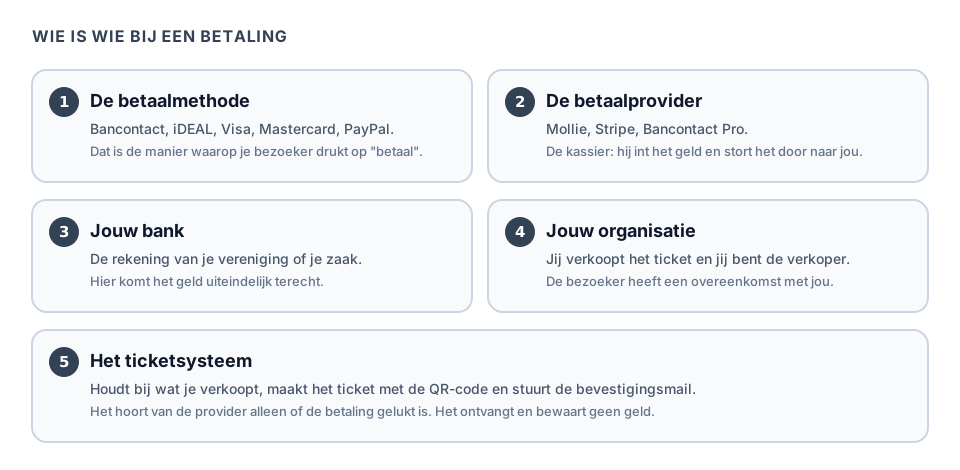
- The payment method is the way of paying: Bancontact, iDEAL, Visa, Mastercard, PayPal. That is the button your visitor presses.
- The payment provider is the company that handles that payment: Mollie, Stripe, Bancontact Pro. One provider usually offers several methods. See Which payment provider do you choose?
- Your bank is where the money finally lands. That is simply the account of your association or your business. You do not have to change bank for it.
- Your organisation is the seller. The visitor buys from you, not from us and not from Mollie.
- Passavo is the ticketing system. It keeps track of what you sell, creates the ticket with the QR code and sends the confirmation email.
Where the money travels

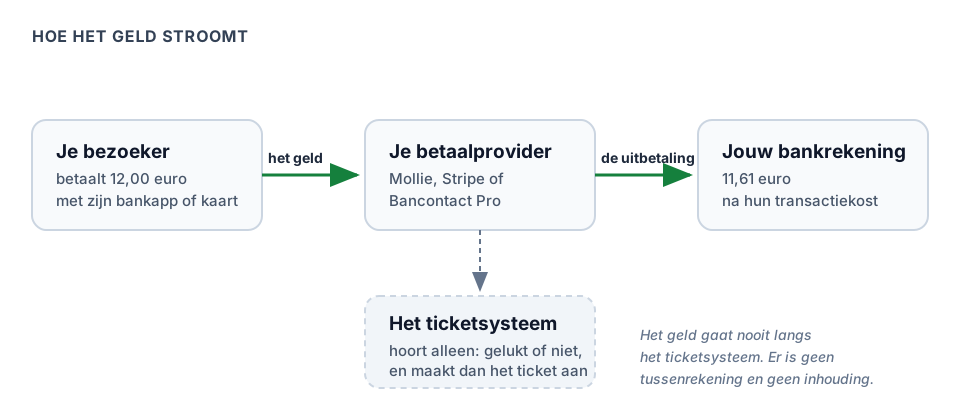
Read the drawing from left to right:
- Your visitor pays €12.00 with their banking app or their card.
- Their bank gives that money to your payment provider.
- That provider keeps back its transaction fee — how much that is, is on its own price list — and transfers the rest to your bank account. How often that happens, you set with the provider itself.
And Passavo? That is at the bottom of the drawing, with a dotted line. We hear one thing from the provider: succeeded or did not succeed. After that we create the ticket and send the email.
Passavo never receives your money and never holds on to it. There is no intermediate account, no waiting period of thirty days, and no amount that we keep back from your revenue. You connect your own account with the provider, and the provider pays out directly to you.
That is not only pleasant, it is also safer for you. If something goes wrong at our end, your cash is not part of it. Last week's ticket sales have long been in your own account.
What we do do with payments, then
To be honest about what happens here:
| What | Who does it |
|---|---|
| Working out the amount (price, discount, VAT) | Passavo |
| Sending the visitor to the payment page | Passavo |
| Receiving the card number or the bank code | The provider. We never see it. |
| Collecting and holding the money | The provider |
| Transferring the money to your account | The provider |
| Creating the ticket and the confirmation email | Passavo |
| Knowing whether a payment succeeded | Passavo, via a message from the provider |
| Starting a refund | You, in Passavo — the money comes from your provider |
So your visitors' card numbers and account numbers never reach us. See also Privacy and terms.
What you need beforehand
Before you start on an account with a provider:
- A company number. In Belgium that is your KBO number, in the Netherlands your KvK number. A non-profit has one too. Note: an informal association without a company number cannot open an account with most providers — read on at What if I have no company number?
- A bank account in the name of your organisation. Not the treasurer's private account. Providers check that.
- Proof of identity for the person opening the account, and usually for the other directors as well.
- The right person. Whoever opens the account must be allowed to represent the organisation. With a non-profit that is a director.
- Time. Allow one to five working days for the check. See the timeline below.
- In Passavo: the Owner role. Only that role may go to Settings → Payments. See Staff and roles.
How long does all that take?
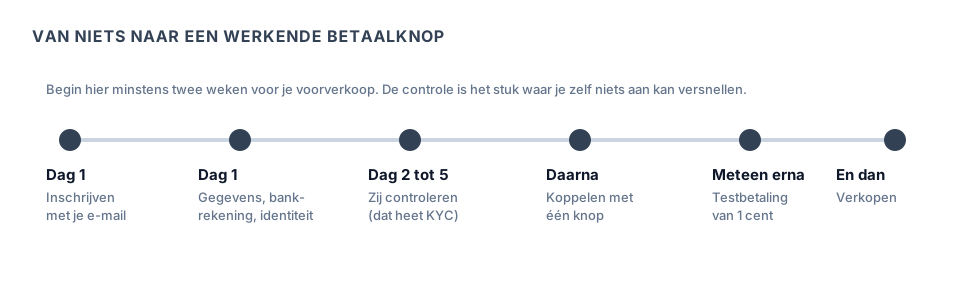
The part you cannot speed up yourself is the check in the middle. A provider is legally obliged to establish who you are before it may collect money for you. That is called KYC, know your customer. See the glossary.
Start on that at least two weeks before your advance sale. The most common mistake in this whole chapter is an association that has its posters printed on Monday and discovers on Tuesday that its payment account has not been approved yet.
The road you travel
- Choose a provider. See Which payment provider do you choose? There you find which methods each of them offers, in which countries which method works, and who they are intended for.
- Create an account there. There is a separate article per provider covering every screen: Mollie, Stripe or Bancontact Pro.
- Connect that account to Passavo. With Mollie and Stripe that is one button; with Bancontact Pro you paste a key. See Connecting your payment provider.
- Test the whole chain. See Testing with a payment of 1 cent.
- Sell.
Commonly made mistakes
Starting too late. See above. The check takes days, not minutes.
Giving a private account. The account has to be in the name of the organisation you give. A provider that sees a difference in name blocks the payout — and then your money is stuck somewhere while your dinner event is tomorrow.
Thinking you have an account with us. Your balance sits with your provider, not with us. If you want to know when you will be paid out, look in your provider's dashboard.
Thinking only about Bancontact. Bancontact exists only in Belgium. If a Dutch visitor comes to your site, they want iDEAL. If a German comes, they want their card. See the country table in Which payment provider do you choose?
Choosing a provider on the basis of one cent's difference. The differences in rates are small. The difference in which methods your visitors know is large.
What if …
What if I have no company number?
An informal association — a group of people without a legal form, such as many neighbourhood committees and card clubs — has no company number, and cannot open a merchant account with most payment providers.
Three ways out, in order of how often they work:
- Sell under the umbrella you already have. Many informal associations hang on a non-profit: the parents' council on the school, the card club on the community centre, the brass band on its umbrella association. Ask whether you may sell under their company number, and agree how the money is passed on. Put that agreement in writing, even among friends.
- Set up a non-profit. In Belgium that is a matter of statutes, a publication and a few hundred euros. Worth it if you sell every year; excessive for a single dinner event.
- Sell free registrations and collect the money separately. Your ticket shop keeps working without a payment provider, as long as you only put zero-euro products in it. So you run registrations at zero euros and settle in cash on the spot, or by bank transfer beforehand. You lose the automatic confirmation of the payment, not the ticket sale.
Note: a provider that cannot place your organisation will block your account sooner or later. So do not do this on the account of a private individual "just to sort it out quickly". It is then your private account that gets frozen.
What if I already have a payment terminal from my bank?
That is a different device for a different situation: the terminal is for payments at the door, a payment provider is for payments online. You can have both. See The desk till.
What if I do not want to connect any provider at all?
Then your ticket shop keeps working for free registrations: the same order, the same confirmation email, the same scannable ticket, only without a payment. For a members' meeting or an open day that is often exactly enough.
Note: do not put any paid products online in that case. Your shop does show them, but a visitor who chooses one only gets the message Payment is not possible at the moment when paying — after filling in their whole order.
What if my organisation is in another country?
Then it depends on which provider is active there and which methods your visitors are used to. The country table in Which payment provider do you choose? shows what works per country.
Frequently asked questions
Do you get a share of every ticket? No. In this system there is no amount per ticket sold and no percentage of your revenue. What you pay us is the fixed amount of your plan (nothing on the free plan) and possibly a purchase you make yourself, such as paying separately for one event. See Payout and costs.
Do you see how much I earn? We see the amounts of your orders, because we work those out ourselves — that is what appears in your own overviews. What is in your bank account and what your provider pays out to you, we do not see.
Can I connect more than one? Yes, you can connect several. One of them is the active provider for your ticket shop at any time; you designate it with the Use this provider button.
Does my visitor have to create an account somewhere? No. They pay with their own banking app or their own card, as in a web shop. There is nothing for them to install.
What happens if somebody stops paying halfway through? Then their order stays open and no ticket appears. They can simply try again. Nothing is debited.
Updated on 2026-09-23
Read next
-
Payments and payouts
Which payment provider do you choose?
Mollie, Stripe and Bancontact Pro side by side — which payment methods, where to find thei...
-
Payments and payouts
Creating a Mollie account, step by step
From signing up to approved — which details Mollie asks for, why, and what you do while yo...
-
Payments and payouts
Creating a Stripe account, step by step
For anyone selling internationally or based outside the Mollie countries — signing up, act...
Still stuck? Write to us at support@passavo.eu